
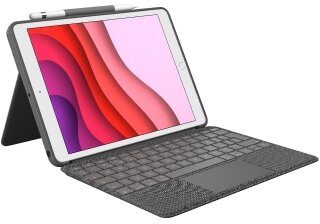
Logitech Combo Touch - Tastatur und Folioh?lle - mit Trackpad - hintergrundbeleuchtet - Apple Smart connector - QWERTY - Pan Nordisch - Graphite - f?r Apple 10.5-inch iPad Air (3. Generation)
Axtro ID: 1928895Merk: LogitechSKU: 920-009644EAN: 5099206090309
€ 159,30excl. BTW
Niet beschikbaarDas Tastatur-Case er?ffnet ganz neue Dimensionen bei Vielseitigkeit und Schutz. Tippen, Anschauen, Zeichnen und Lesen mit Combo Touch und iPad. Das gro?e Trackpad und die Notebook-?hnliche Tastatur erm?glichen m?heloses Arbeiten und kreatives Arbeiten. M?glichkeiten? Unbegrenzt.
A CASE YOU’LL REALLY CLICK WITHThe ultimate case for iPad (7th, 8th and 9th gen) has just touched down. Combo Touch combines a precision trackpad with a full-size keyboard for your iPad. Full Multi-Touch gesture support transforms your iPad into a productivity machine for working in spreadsheets and documents, a robust learning tool for remote classes, and more—the possibilities are endless.
GREAT PRECISIONWork with trackpad precision in apps like Notes, Pages, Numbers, and Keynote. You’ll be able to highlight spreadsheet cells, copy words, and edit emails with ease.
GREAT CONTROLFast track your productivity with the multi-finger gesture controls you already know and love. Swipe, scroll, switch apps, pinch, double-tap, and more.
BACKLIT KEYSEnjoy using iPad in your bedroom with the lights down low? We do, too. That’s why the integrated keyboard comes equipped with backlit keys. Five adjustable levels of brightness ensure you can see what you’re doing whether you’re in the bedroom, on a plane, camping, or any other low-light environment.
YOUR FINGERS WILL THANK YOUOver 20 years of typing innovation goes into every keyboard Logitech makes so your keystrokes are fluid, natural, and accurate. Enjoy hours of comfortable typing thanks to large, well-spaced keys stretched edge-to-edge so your hands won’t feel crowded. Logitech keyboards feature a scissor mechanism beneath each key to deliver the perfect bounce every time.
FULL ROW OF iOS SHORTCUT KEYSForget hunting around the screen or in menus to perform simple actions — Combo Touch features a full row of shortcut keys.
1 - Home: go to home screen
2 - Screen brightness: adjusts brightness up or down
3 - Virtual Keyboard: shows/hides the onscreen keyboard
4 - Search: brings up iOS search field
5 - Key brightness: adjusts key backlighting up or down
6 - Media controls: Back, Play/Pause, Forward
7 - Volume controls: Mute, Volume up, Volume down
8 - Screen on/off: locks iPad screen
FOUR USE MODESCombo Touch is flexible enough for any task.
Typing Mode: Dock the keyboard upright and pull out the kickstand to type out notes or emails.
Viewing Mode: Detach the keyboard and pull out the kickstand to watch movies and TV shows.
Sketching Mode: Fully extend the kickstand back for the perfect angle to take notes or draw with Apple Pencil (1st gen) or Logitech Crayon.
Reading Mode: Tuck the kickstand in and detach the keyboard to read books, articles, and more.
LEAVE THE KEYBOARD BEHINDWhen you finish typing, detach the keyboard and enjoy your beautiful iPad screen.
ANY ANGLE KICKSTANDFlexible kickstand offers 40° of tilt so you can always find the right angle for the task at hand. A sturdy mechanical hinge ensures the kickstand stays firmly in place and does not collapse, even with strong tapping.
PERFECTLY COMPLEMENTS YOUR iPadCombo Touch was designed to look and feel like a natural extension of your iPad. Once you’ve felt the premium materials and experienced hearing the compliments from curious friends and coworkers, you’ll wonder how you ever lived without it.
POWER AND PAIR IN ONE CLICKBatteries aren’t included, because you’ll never need them. Combo Touch sources power, pairs, and even securely transfers data all via the Smart Connector.
FRONT AND BACK PROTECTIONKeep the front and back of your iPad safe from scuffs, scratches, and spills. Combo Touch securely holds iPad in a lightweight case that keeps corners protected and doesn’t weigh you down. Woven outer fabric is soft to the touch.
THE PERFECT COMBODesigned to work with both Logitech Crayon and Apple Pencil (1st gen) so you can hand-write notes, sketch drawings, or mark up documents directly on iPad. Plus, a built-in holder stores your stylus so it’s always there when you need it.
AUTO ON/OFFSimply open up Combo Touch to wake iPad and turn the keyboard on. Then close it to put them both to sleep automatically.
LOGITECH CONTROL APPGet more out of your Combo Touch using . Fine-tune keyboard lighting, make firmware updates easier, and more.
2-YEAR WARRANTYIf you need help with a product, our is happy to help. Learn more about our .
The ultimate case for iPad (7th, 8th and 9th gen) has just touched down. Combo Touch combines a precision trackpad with a full-size keyboard for your iPad. Full Multi-Touch gesture support transforms your iPad into a productivity machine for working in spreadsheets and documents, a robust learning tool for remote classes, and more—the possibilities are endless.
A CASE YOU’LL REALLY CLICK WITHThe ultimate case for iPad (7th, 8th and 9th gen) has just touched down. Combo Touch combines a precision trackpad with a full-size keyboard for your iPad. Full Multi-Touch gesture support transforms your iPad into a productivity machine for working in spreadsheets and documents, a robust learning tool for remote classes, and more—the possibilities are endless.
GREAT PRECISIONWork with trackpad precision in apps like Notes, Pages, Numbers, and Keynote. You’ll be able to highlight spreadsheet cells, copy words, and edit emails with ease.
GREAT CONTROLFast track your productivity with the multi-finger gesture controls you already know and love. Swipe, scroll, switch apps, pinch, double-tap, and more.
BACKLIT KEYSEnjoy using iPad in your bedroom with the lights down low? We do, too. That’s why the integrated keyboard comes equipped with backlit keys. Five adjustable levels of brightness ensure you can see what you’re doing whether you’re in the bedroom, on a plane, camping, or any other low-light environment.
YOUR FINGERS WILL THANK YOUOver 20 years of typing innovation goes into every keyboard Logitech makes so your keystrokes are fluid, natural, and accurate. Enjoy hours of comfortable typing thanks to large, well-spaced keys stretched edge-to-edge so your hands won’t feel crowded. Logitech keyboards feature a scissor mechanism beneath each key to deliver the perfect bounce every time.
FULL ROW OF iOS SHORTCUT KEYSForget hunting around the screen or in menus to perform simple actions — Combo Touch features a full row of shortcut keys.
1 - Home: go to home screen
2 - Screen brightness: adjusts brightness up or down
3 - Virtual Keyboard: shows/hides the onscreen keyboard
4 - Search: brings up iOS search field
5 - Key brightness: adjusts key backlighting up or down
6 - Media controls: Back, Play/Pause, Forward
7 - Volume controls: Mute, Volume up, Volume down
8 - Screen on/off: locks iPad screen
FOUR USE MODESCombo Touch is flexible enough for any task.
Typing Mode: Dock the keyboard upright and pull out the kickstand to type out notes or emails.
Viewing Mode: Detach the keyboard and pull out the kickstand to watch movies and TV shows.
Sketching Mode: Fully extend the kickstand back for the perfect angle to take notes or draw with Apple Pencil (1st gen) or Logitech Crayon.
Reading Mode: Tuck the kickstand in and detach the keyboard to read books, articles, and more.
LEAVE THE KEYBOARD BEHINDWhen you finish typing, detach the keyboard and enjoy your beautiful iPad screen.
ANY ANGLE KICKSTANDFlexible kickstand offers 40° of tilt so you can always find the right angle for the task at hand. A sturdy mechanical hinge ensures the kickstand stays firmly in place and does not collapse, even with strong tapping.
PERFECTLY COMPLEMENTS YOUR iPadCombo Touch was designed to look and feel like a natural extension of your iPad. Once you’ve felt the premium materials and experienced hearing the compliments from curious friends and coworkers, you’ll wonder how you ever lived without it.
POWER AND PAIR IN ONE CLICKBatteries aren’t included, because you’ll never need them. Combo Touch sources power, pairs, and even securely transfers data all via the Smart Connector.
FRONT AND BACK PROTECTIONKeep the front and back of your iPad safe from scuffs, scratches, and spills. Combo Touch securely holds iPad in a lightweight case that keeps corners protected and doesn’t weigh you down. Woven outer fabric is soft to the touch.
THE PERFECT COMBODesigned to work with both Logitech Crayon and Apple Pencil (1st gen) so you can hand-write notes, sketch drawings, or mark up documents directly on iPad. Plus, a built-in holder stores your stylus so it’s always there when you need it.
AUTO ON/OFFSimply open up Combo Touch to wake iPad and turn the keyboard on. Then close it to put them both to sleep automatically.
LOGITECH CONTROL APPGet more out of your Combo Touch using . Fine-tune keyboard lighting, make firmware updates easier, and more.
2-YEAR WARRANTYIf you need help with a product, our is happy to help. Learn more about our .
- Modes
- 4 Modes: Type, View, Sketch, Read
- Keyboard type
- Detachable keyboard
- Backlit keys
- Yes
- Viewing angles
- Type Mode: 60°Sketch Mode: 20°
- Power and connectivity
- Power by iPad via Smart Connector
- Case
- Space to stow Apple Pencil (1st gen)Front and back protectionAccess all ports: Camera / Lightning
- Keyboard
- 5 levels of adjustable backlightingFull row of iOS shortcut keysCombo Touch for iPad (7th, 8th & 9th gen): 18 mm key pitch; 1 mm key travelCombo Touch for iPad Air and iPad Pro 10.5: 18 mm key pitch; 1 mm key travel
- Row of ipados shortcut keys (left to right)
- HomeScreen brightness downScreen brightness upOnscreen keyboardSearchKey brightness downKey brightness upPrevious trackPlay/pauseNext trackVolume muteVolume downVolume upLock
- Height
- 195 mm
- Width
- 257 mm
- Depth
- 22.55 mm
- Weight
- 610 g
- Height
- 195 mm
- Width
- 257 mm
- Depth
- 21.64 mm
- Weight
- 610 g
- Modes
- 4 Modes: Type, View, Sketch, Read
- Keyboard type
- Detachable keyboard
- Backlit keys
- Yes
- Viewing angles
- Type Mode: 60°Sketch Mode: 20°
- Power and connectivity
- Power by iPad via Smart Connector
- Case
- Space to stow Apple Pencil (1st gen)Front and back protectionAccess all ports: Camera / Lightning
- Keyboard
- 5 levels of adjustable backlightingFull row of iOS shortcut keysCombo Touch for iPad (7th, 8th & 9th gen): 18 mm key pitch; 1 mm key travelCombo Touch for iPad Air and iPad Pro 10.5: 18 mm key pitch; 1 mm key travel
- Row of ipados shortcut keys (left to right)
- HomeScreen brightness downScreen brightness upOnscreen keyboardSearchKey brightness downKey brightness upPrevious trackPlay/pauseNext trackVolume muteVolume downVolume upLock
- Height
- 195 mm
- Width
- 257 mm
- Depth
- 22.55 mm
- Weight
- 610 g
- Height
- 195 mm
- Width
- 257 mm
- Depth
- 21.64 mm
- Weight
- 610 g