
Tablet accessoires
MS Surface Pro8/9 TypeCover + Pen Bundle Platinum Silver QWERTY
Axtro ID: 489580Merk: MICROSOFTSKU: 8X8-00067EAN: 0889842776225
€ 243,42excl. BTW
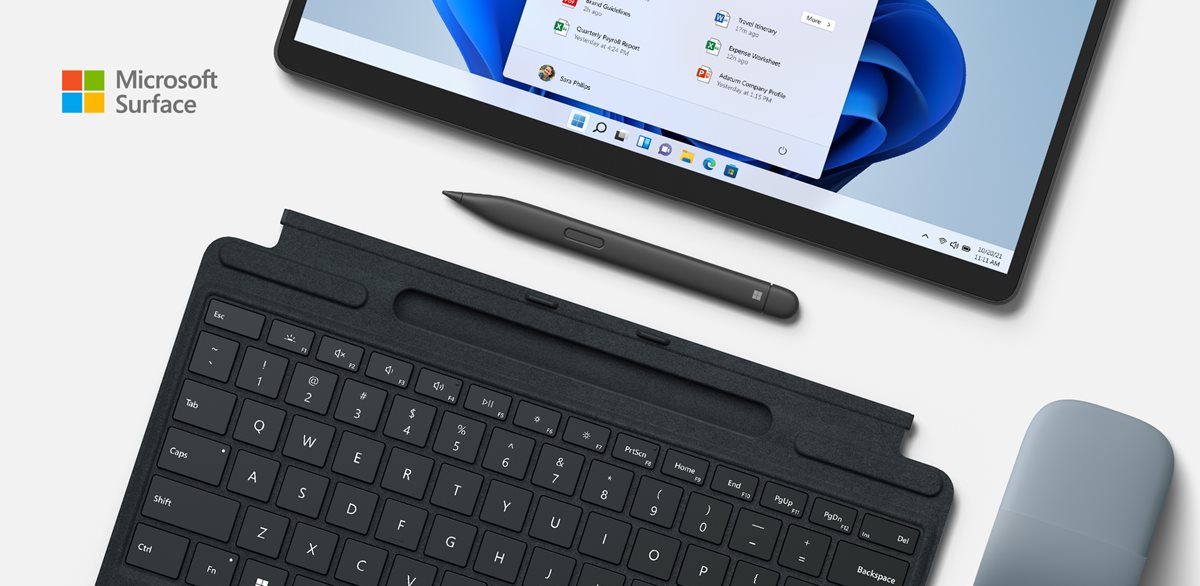
Niet beschikbaarMicrosoft Surface Pro Signature Keyboard in Platinum with Slim Pen 2Always ready at your fingertips. Surface Slim Pen 2 recharges in the built-in storage tray. Take notes naturally. The haptic motor in Surface Slim Pen 2 brings the feeling of writing and drawing on paper when used with Surface Pro 8.2 Features a full mechanical keyset, backlit keys, and large trackpad for precise navigation and control. Typing and writing in one without the bulk, Surface Pro Signature Keyboard delivers fast and accurate typing like a traditional, full-size keyboard, plus natural on-screen writing Work your way anywhere. Surface Pro Signature Keyboard clicks into place instantly and stays securely attached so you always have your pen and keyboard with you. Use with Surface Pro 8* or Surface Pro X* Kickstand for a full laptop experience. Close to protect screen and conserve battery, or fold back completely for a tablet. Optimum key spacing for fast and accurate typing.
Store, charge, type and writeNext-level versatility comes in the perfect pair — Surface Slim Pen 2 stores securely and recharges in the premium keyboard, featuring a large glass touchpad and luxurious, Alcantara® material covering. Ready to pair with Surface Pro 8* and Surface Pro X.*
Always at your fingertipsTransform Surface Pro 8* or Surface Pro X* into a full laptop with this premium keyboard. And with Surface Slim Pen 2 stored, charged and close at hand, it delivers typing and on-screen writing in one.
An exceptional typing experienceType in comfort with Surface Pro Signature Keyboard. Sleek and compact, it performs like a traditional laptop keyboard, complete with a large trackpad for precise control and navigation.
Store, charge, type and writeNext-level versatility comes in the perfect pair — Surface Slim Pen 2 stores securely and recharges in the premium keyboard, featuring a large glass touchpad and luxurious, Alcantara® material covering. Ready to pair with Surface Pro 8* and Surface Pro X.*
Always at your fingertipsTransform Surface Pro 8* or Surface Pro X* into a full laptop with this premium keyboard. And with Surface Slim Pen 2 stored, charged and close at hand, it delivers typing and on-screen writing in one.
An exceptional typing experienceType in comfort with Surface Pro Signature Keyboard. Sleek and compact, it performs like a traditional laptop keyboard, complete with a large trackpad for precise control and navigation.
- Feature
- Microsoft Surface Pro Signature Keyboard in Platinum with Slim Pen 2Always ready at your fingertips. Surface Slim Pen 2 recharges in the built-in storage tray. Take notes naturally. The haptic motor in Surface Slim Pen 2 brings the feeling of writing and drawing on paper when used with Surface Pro 8.2 Features a full mechanical keyset, backlit keys, and large trackpad for precise navigation and control. Typing and writing in one without the bulk, Surface Pro Signature Keyboard delivers fast and accurate typing like a traditional, full-size keyboard, plus natural on-screen writing Work your way anywhere. Surface Pro Signature Keyboard clicks into place instantly and stays securely attached so you always have your pen and keyboard with you. Use with Surface Pro 8* or Surface Pro X* Kickstand for a full laptop experience. Close to protect screen and conserve battery, or fold back completely for a tablet. Optimum key spacing for fast and accurate typing.
- Feature
- Store, charge, type and writeNext-level versatility comes in the perfect pair — Surface Slim Pen 2 stores securely and recharges in the premium keyboard, featuring a large glass touchpad and luxurious, Alcantara® material covering. Ready to pair with Surface Pro 8* and Surface Pro X.*
- Feature
- Always at your fingertipsTransform Surface Pro 8* or Surface Pro X* into a full laptop with this premium keyboard. And with Surface Slim Pen 2 stored, charged and close at hand, it delivers typing and on-screen writing in one.
- Feature
- An exceptional typing experienceType in comfort with Surface Pro Signature Keyboard. Sleek and compact, it performs like a traditional laptop keyboard, complete with a large trackpad for precise control and navigation.
- Feature
- Fast, fluid, and perfect with your SurfaceOur best performing pen yet, with real-time writing, pin-point accuracy, and incredible shading thanks to a sharper pen tip and improved design.
- Feature
- Choose your colorAvailable in rich colors,1 Surface Pro Signature Keyboard adds a warm, comfortable touch to everyday tasks. Covered with luxurious Alcantara® material.
- Feature
- [*] Some software, accessories, and devices sold separately. App availability may vary by market. [1] Available colors may vary by market. [2] Tactile signals in Surface Slim Pen 2 can be experienced on some applications on Surface Laptop Studio and Surface Pro 8 running Windows 11. Surface Laptop Studio and Surface Pro 8 sold separately. [3] Microsoft’s Limited Warranty is in addition to your consumer law rights. [4] Zero force inking will only be work when Surface Slim Pen 2 is used with Surface Pro 8, Surface Pro X, Surface Laptop Studio, and Surface Duo 2. Additional compatibility details can be found at aka.ms/SurfaceSlimPenCompatiblity. [5] Surface Slim Pen 2 tilt functionality is available with Surface Laptop Studio, Surface Pro 3-Pro 8; Surface Pro X; Surface Go 1-Go 3; Surface Laptop 1-4; Surface Studio 1,2; Surface Book 1-3. Additional compatibility details can be found at aka.ms/SurfaceSlimPenCompatibility. [6] Pairing functionality requires Windows 10, Windows 11, or Androi
- Feature
- Always ready at your fingertips. Surface Slim Pen 2 recharges in the built-in storage tray.
- Feature
- Take notes naturally. The haptic motor in Surface Slim Pen 2 brings the feeling of writing and drawing on paper when used with Surface Pro 8.2
- Feature
- Features a full mechanical keyset, backlit keys, and large trackpad for precise navigation and control.
- Feature
- Typing and writing in one without the bulk, Surface Pro Signature Keyboard delivers fast and accurate typing like a traditional, full-size keyboard, plus natural on-screen writing
- Feature
- Work your way anywhere. Surface Pro Signature Keyboard clicks into place instantly and stays securely attached so you always have your pen and keyboard with you. Use with Surface Pro 8* or Surface Pro X* Kickstand for a full laptop experience.
- Feature
- Close to protect screen and conserve battery, or fold back completely for a tablet.
- Feature
- Optimum key spacing for fast and accurate typing.
- Designed for:
- Surface Pro Signature Keyboard:Surface Pro 9Surface Pro 8* Surface Pro X*Surface Slim Pen 2:Surface Laptop StudioSurface Pro 3 – Pro 9Surface Pro XSurface Duo, Duo 2Surface Go, Go 2, Go 3Surface Hub 2SSurface Laptop 1-4Surface Studio 1,2Surface Book 1-3Non-Surface devices that support Microsoft Pen Protocol (MPP)
- Dimensions
- Surface Pro Signature Keyboard:11.38 x 8.90 x .19 in (289.1 x 226.1 x 4.89 mm) Surface Slim Pen 2:5.38 x 0.44 x 0.25 in (136.8 x 11.3 x 6.3 mm)
- Weight
- Surface Pro Signature Keyboard:0.62 lbs (281 grams)Surface Slim Pen 20.03 lbs (13 g)
- Keys
- Surface Pro Signature KeyboardActivation: Moving (mechanical) keysLayout: QWERTY, full row of function keys (F1 - F12)Dedicated buttons for Windows shortcuts, media controls, screen brightnessRight click button
- Pen integration
- Surface Pro Signature KeyboardSurface Slim Pen 2 storage and charging
- Interface
- Surface Pro Signature KeyboardMagnetic
- Sensors
- Surface Pro Signature KeyboardAccelerometer
- Exterior
- Surface Pro Signature KeyboardMaterial: Alcantara® Colors: Platinum, Poppy Red, Ice Blue, Black1Surface Slim Pen 2:Matte Black Plastic Enclosure
- Warranty
- Surface Pro Signature Keyboard and Slim Pen 2:1-year limited hardware warranty3
- Connections
- Surface Slim Pen 2:Bluetooth® Wireless 5.0 technology
- Buttons
- Surface Slim Pen 2:Side button, Top Button with eraser functionality
- Tactile signals
- Surface Slim Pen 2:Haptic feedback functionality compatible only with Surface Pro 8 and Laptop Studio with Windows 11*
- Pressure sensitivity
- Surface Slim Pen 2:4,096 pressure levels Zero force inking4
- Battery
- Surface Slim Pen 2:Rechargeable Lithium IonUp to 15 hours of typical usage7
- Battery capacities
- Surface Slim Pen 2:Battery Capacity Nominal (WH): 0.171 Battery Capacity Min (WH): 0.164
- Storing and charging (Sold separately)
- Surface Slim Pen 2:Slim Pen storage and charging in Surface Pro Signature Keyboard, Surface Laptop Studio, Surface Duo 2 Pen Cover, Surface Slim Pen Charger, and Surface Slim Pen 1 USB-C Charging Base8
- What's in the box
- Surface Slim Pen 2: · Quick Start Guide · Safety and warranty documents